Setting up MySQL Client
- Install MySQL Workbench
- To start MySQL in Local machine, Go To Start-> All Programs->MySQL->MySQL Workbench
- OR
- You can search in “Start” as MySQL Workbench in your Machine e.g Click OS Start button-> write MySQL Workbench
- After MySQL started in your local machine you can see below page.

- Click on “+” button side to MySQL Connections as shown in below image

- It will open a new pop up page name “ Setup New Connection ” as shown in below image.

- Click on Connection Method dropdown, Choose “Standard TCP/IP over SSH” as shown below

- After selecting “Standard TCP/IP over SSH” you will see the below page.
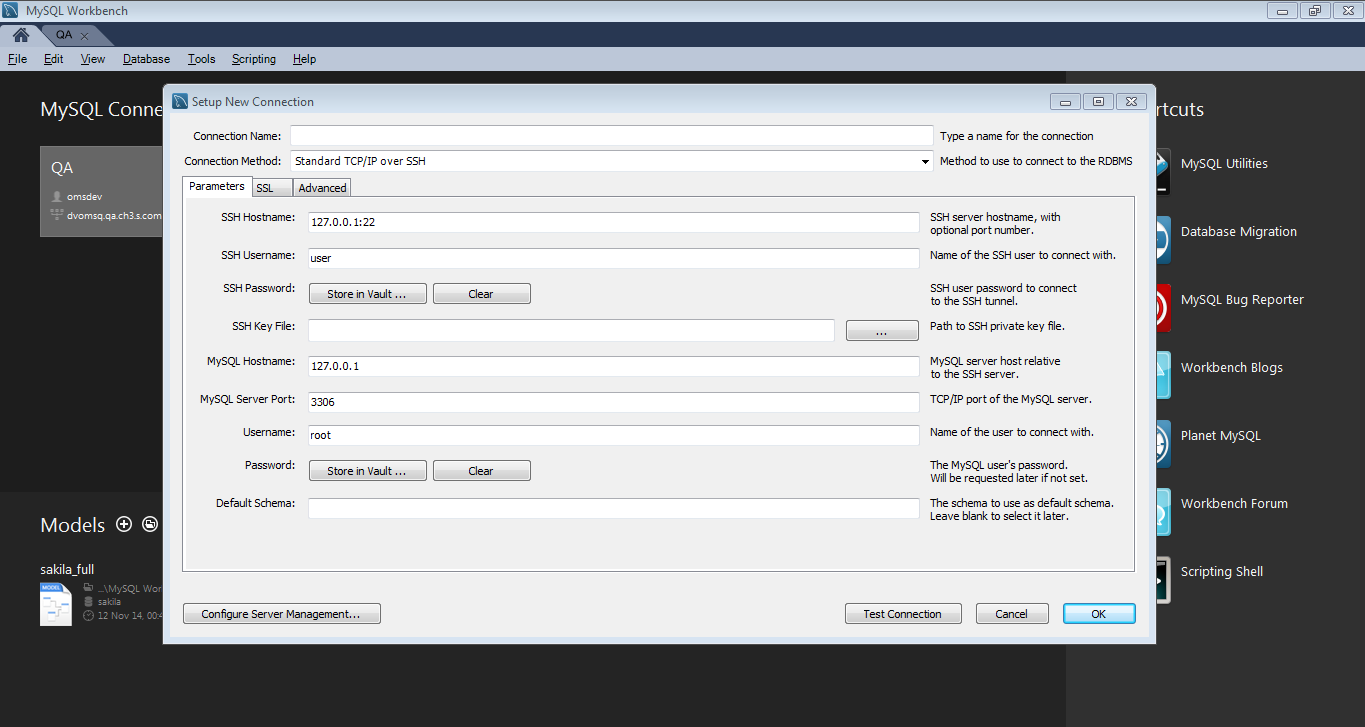
- Note : If all options are not visible you can expand the small pop up page
- Put these details in the new Pop up page ( Setup New Connection )
- Connection Name : SampleConnection
- SSH Hostname : servername.com
- SSH Username : Your user name
- Password : Your password
- Password always needs to store in vault ( MySQL Secure place )
- Follow same “Store in Vault …” Procedure as described above
- Put password in the Password field
- Press OK
- MySQL Hostname : db servername.com
- Username :db user name
- Password :db password
- Password always needs to store in vault ( MySQL Secure place )
- Follow same “Store in Vault …” Procedure as described above
- Default Schema : schema name(optional)
- Press “Test Connection” You will see a connection success message.
- Press "OK" Button
- After Pressing "Ok" Button, SampleConnection will be visible in below MySQL Connection Area
Enjoy Reading.
